Need 1
Prepared agenda
- DecisionsStanding agendas and templates
- Email, chat and docsSometimes
- AI notetakerNo
- Planner on its ownNo

Decisions is a secure meeting management system for Microsoft 365 and Teams. For project and program managers, that means every project meeting, from the kick-off to the steering committee meeting, ends with logged decisions and tasks that have an owner and a due date, synced to Microsoft Planner and ready for action. So you stop chasing, and the project keeps moving.
Free to start · Runs inside Teams · Nothing to install
Weekly project status meeting
Mon, Oct 19 · Minutes shared


+4
Decision logged
Move Phase 2 go-live to Nov 3
Supplier testing needs two more weeks before go-live.
Tasks synced to Planner
Update the supplier delivery planMaria K. · Due Fri, Oct 23Planner
Prepare the scope change for the steering committeeJonas L. · Due Mon, Oct 26PlannerNext meeting: Mon, Oct 26 · 2 open tasks to review
THE FOLLOW-THROUGH GAP
Project decisions aren’t followed through when what was decided in the meeting never turns into clear tasks with an owner and a due date. People leave unsure of what they’re supposed to do, nobody can see the status of open tasks, and so things don’t get done.
Project teams often meet several times a week, so the gap grows fast. Commitments end up in chat, email and personal notebooks, and the project manager spends the time between meetings chasing people and rebuilding status by hand.
It’s not a people problem. Projects run on meetings, and those meetings deserve a system that turns every agreement into follow-up you don’t have to chase.
A familiar week
The steering committee meeting approves a scope change and agrees on three follow-ups.
3 follow-ups agreed
In the project meeting, one follow-up is done. One is “in progress” in someone’s head. Nobody is sure who took the third.
1 done, 1 no update, 1 owner unclear
The next project meeting starts with ten minutes of “where were we?”
10 minutes lost rebuilding status
55%
of workers surveyed said next steps weren’t clear at the end of a meeting.
FROM ONE MEETING TO THE NEXT
Decisions gives every project meeting a prepared agenda, a well-structured meeting, a clear record of what was decided, and tasks that land in Microsoft Planner with an owner and a due date. Each recurring meeting picks up where the last one ended, so status builds up meeting by meeting instead of being rebuilt.
Before
Show up prepared
Set up a standing agenda once, with open items from last time automatically suggested. Everyone can add or suggest agenda items, like a status on their own tasks. AI can draft it in seconds.
During
Focus on what matters
Run the meeting in Teams with an agenda that’s easy to follow, so everyone knows what happens when. AI picks up decisions and tasks from the discussion, so nobody has to take notes. Bring in guests for just the topics where you need them.
After
Leave with everything handled
Tasks sync to Planner and To Do with owner and due date, so everyone knows what to do. Decisions go into a searchable log, and recaps or minutes are shared in one click.
Between
Every meeting builds on the last one
Open tasks, follow-ups and unfinished items are automatically suggested for the next agenda. Everyone arrives prepared, and the project keeps moving forward.
PROJECT MEETING TYPES
You can run every meeting in a project or program in Decisions. Each meeting can have a template, so the structure is the same every time and nothing is left to memory.
Project kick-offGoals, roles and milestones agreed, first tasks assigned.
Project status meetingStanding agenda with open tasks carried forward.
Workstream or team syncQuick check-ins where blockers and tasks are captured.
Steering committee meetingPrepared decision items, logged decisions, minutes to share.
Program reviewDecisions and outcomes visible across projects.
Project closeA searchable history of what was decided and when.
GETTING STARTED
Add Decisions from the Teams store and start free with every feature unlocked. It runs inside Teams, so there’s no separate desktop app, and you can be up and running before your next project meeting.
Step 1
Add to Teams
Your project team keeps meeting in Teams, where they already work. Agendas, decisions and follow-up come together without anyone switching tools.
Step 2
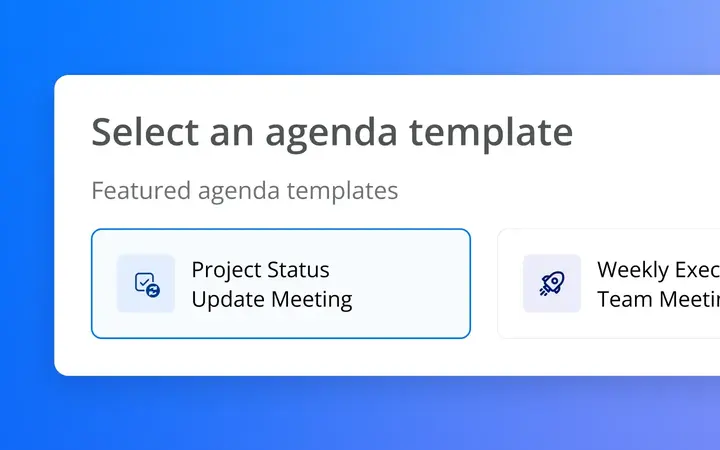
Set up a standing agenda
Build your status agenda once, from a template or your own items. It repeats for each meeting, ready for your team’s updates.
Step 3
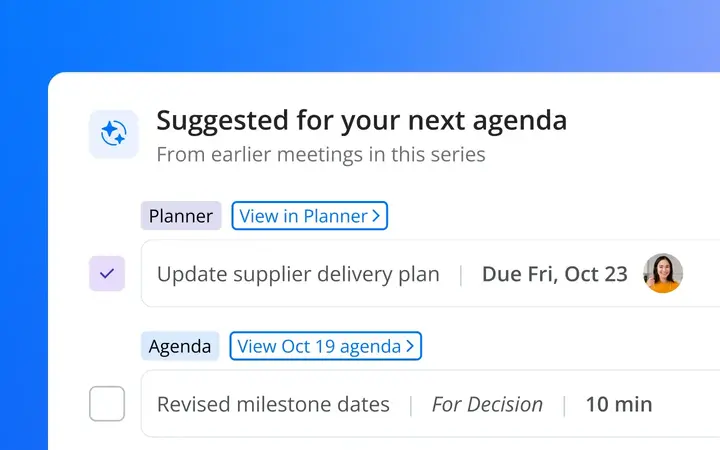
Run it and follow up
Everyone leaves knowing who does what by when, with tasks in Planner. Unfinished tasks and topics are automatically suggested for your next agenda.

| Need | Email, chat and docs | AI notetaker | Planner on its own | Decisions |
|---|---|---|---|---|
| Prepared agenda | Sometimes | No | No | Standing agendas and templates |
| Decisions logged and searchable | No | In the transcript | No | Decision log |
| Tasks with owner and due date | Manual | Suggested in notes | Typed in by hand | Created in the meeting and synced |
| Follow-up carried into the next meeting | No | No | No | Yes, automatically |
| Data stays in your M365 tenant, no bot | Yes | Usually not | Yes | Yes |
Need 1
Need 2
Need 3
Need 4
Need 5
Program managers and PMOs get one view of the decisions made across all their projects, a structured way for project teams to bring topics to the steering committee meeting, and shared templates that give every project the same meeting rhythm. No more collecting status by email before every program review.
See logged decisions and meeting outputs from every project team that shares them in one place, without being a member of each team. Filter by project team, date, decision status, keyword or tag.
Project teams submit topics and cases with background and attachments. Everything is collected in one meeting book, so members arrive prepared and decide on prepared material, not on a last-minute email.
Create custom agenda templates for kick-offs, status meetings and steering committee meetings, and use them in every project. Tasks land in Planner buckets by topic.
Make decisions, tasks and minutes available to Microsoft Copilot, Claude or ChatGPT, within your permissions, and ask what was decided across the program last month. Optional, on your terms.
“Decisions consolidates the things we were doing manually into one, easy-to-use solution. It makes our meetings more engaging and efficient. As just one example, tasks recorded in the Word meeting minutes automatically sync into Planner, aligning to our projects.”
Their resultPrep for one recurring regional meeting went from 6 to 8 hours to about one.
Read the Middlesex storyAgendas, minutes, decisions and tasks are stored in your own Microsoft 365, and no third-party bot joins your calls.
AI is always optional. Processing is stateless, with nothing stored or used for training.
Give partners and consultants access to specific agenda items and their attachments, rather than the full agenda.
SOC 2 Type II compliant, ISO 27001:2022 certified, GDPR compliant. Headquartered in Oslo, Norway.