Need 1
Meeting book for members
- DecisionsGenerated from the agenda
- Email and shared foldersPDF built by hand
- Board portalYes
- AI notetakerNo

Decisions is a secure meeting management system that helps boards and committees prepare, run and document their meetings. From meeting book to approved minutes, logged decisions and follow-up tasks with an owner. All inside your own Microsoft 365 tenant.

FROM PAPERS TO FOLLOW-UP
Board and committee meetings are hard to run because most of the work around them is still done by hand.
The hardest part comes after. A decision is made, but it reaches the people who must act on it by email and word of mouth, without clear tasks or owners. At the next meeting, nobody can say whether the decision was carried out, or who is following it up.
Boards and committees make the most important decisions in an organization. They deserve structured meetings built for deciding, where the follow-up is clear.
Ellen Marlow
Who is following up on the budget decision?Thu 1/8
We approved it by email in November, but nobody has an update.
Sam Whitlock
RE: Minutes for review, round 312/15
Two signatures are still missing, so we can’t file them yet.
Priya Hallam
Budget review: we ran out of time11/20
Can we decide it by email instead?
Tom Ashby
RE: Board pack, version 411/19
Which version are we reading? I printed version 3.
Board pack v4 FINAL (2).pdf82%
of directors see opportunities to improve board materials.
FROM ONE MEETING TO THE NEXT
Board and committee meeting management means preparing, running and documenting board and committee meetings in a consistent way. Decisions does all of it inside Microsoft Teams, before, during and after the meeting. And because the rest of the organization meets in Decisions too, every decision reaches the team that will carry it out.
Before
Prepare members well
Build the agenda in draft mode and publish it when it is ready. Management submits cases with background and attachments, and Decisions compiles agenda and papers into one meeting book.
During
Run a focused meeting
Lead the meeting item by item from the Teams side panel, or from the mobile app in the boardroom. A time tracker protects time for the items that need a decision, and members vote openly or anonymously.
After
Capture every decision and task
Every decision goes into a searchable decision log with status and audit trail, and every task gets an owner and a due date. Minutes are written by you or drafted with AI, then approved and signed digitally.
Between
Decisions reach the right teams
Decisions and tasks go to the teams that will carry them out, and tasks sync to Planner and To Do. Progress comes back to the next agenda, so follow-up becomes a standing item, not a search through old minutes.
WHAT TO LOOK FOR
Look for software that covers the full meeting cycle and connects the board to the people who carry out its decisions. Decisions does this for the board and every committee, from audit and risk to remuneration and investment, each in its own secure space in Microsoft Teams.
Cases arrive in one place, with background, proposed decision and attachments.
Generated from the agenda, and members can read and annotate it on mobile.
Draft mode, restricted documents, and guests who see only their own item.
Open or anonymous votes, logged automatically as decisions.
Review, digital approval and electronic signatures.
Searchable decisions, and tasks with an owner and due date in Planner and To Do.
Decisions reach the teams that carry them out, and progress comes back to the next agenda.
Connect Decisions to Copilot, Claude or ChatGPT, within your permissions. Optional.
GETTING STARTED
Add Decisions to Microsoft Teams and prepare your first meeting book.
Step 1
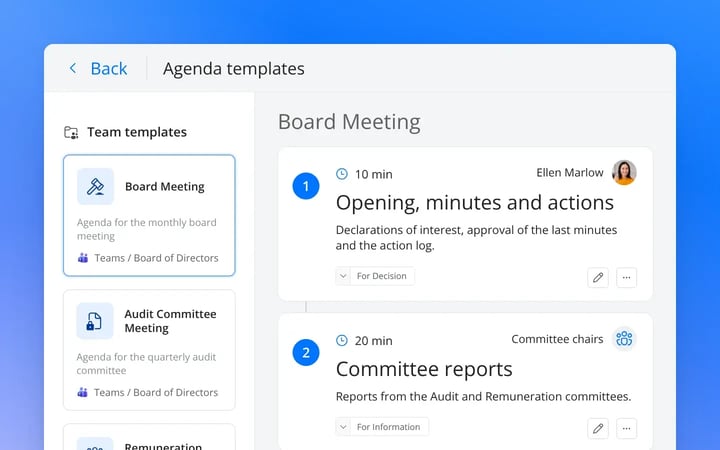
Set up your agenda template
Build the agenda structure once and reuse it for every meeting in the series.
Step 2
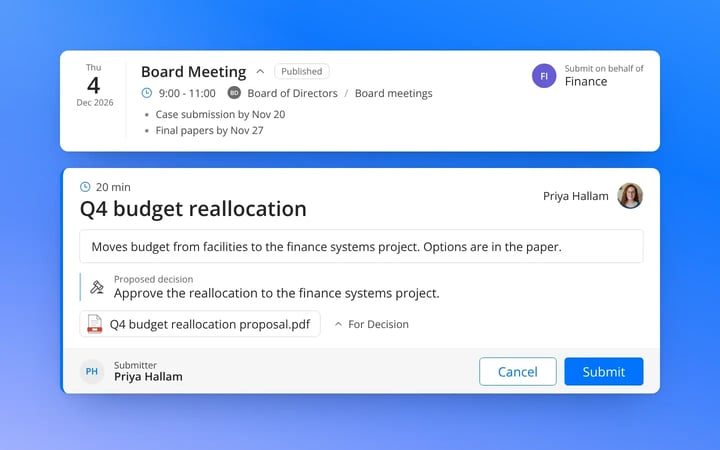
Collect the cases
Ask management to submit cases for the agenda, with background, a proposed decision and papers.
Step 3
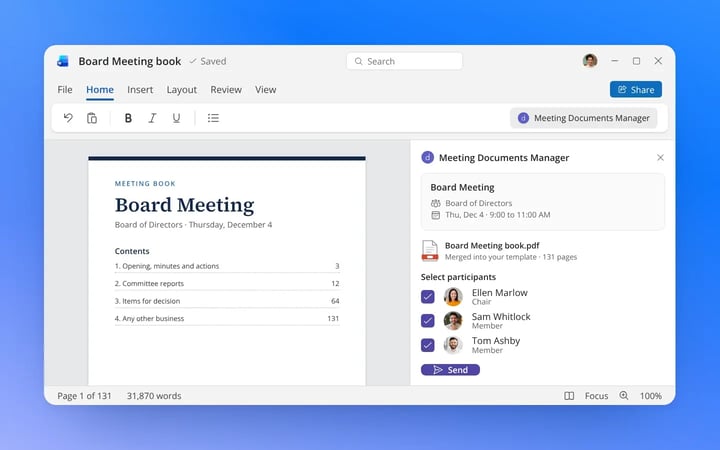
Send the meeting book
Generate the meeting book from the agenda and send it to selected participants when it is ready.

| Need | Email and shared folders | Board portal | AI notetaker | Decisions |
|---|---|---|---|---|
| Meeting book for members | PDF built by hand | Yes | No | Generated from the agenda |
| Secure voting logged as decisions | No | Often | No | Open or anonymous, in the meeting |
| Minutes approval and e-signature | Manual | Often | No | Built in |
| Follow-up tasks with an owner | Manual | Limited | Suggested in notes | Synced to Planner and To Do |
| Connected to the rest of the organization | By email | Boardroom only | No | Board, committees, leadership and teams in one hub |
| Runs in Teams, data in your Microsoft 365 tenant | Yes | Separate platform | Usually not | Yes |
Need 1
Need 2
Need 3
Need 4
Need 5
Need 6
“Our first board meeting with Decisions was so successful that we introduced it for our medical staff meetings.”
Their resultSaves a full day’s work coordinating board meeting materials.
Read the Greene County storyPapers, minutes and decisions stay in your own Microsoft 365 tenant. Decisions staff have no access unless your organization grants it.
AI processing is stateless, with nothing stored or used for training, and AI is always optional.
You control when an agenda is published, who can open each document, and which agenda items a guest presenter can see.
No third-party bot joins your calls.