
Meeting recaps alone won't move your organization forward. Here's the structural fix that high-performing teams are adopting.

Stuck on the Same Agenda Item Every Week?
It's the third budget planning meeting in a row where "Consolidate project tools at renewal" shows up on the agenda. And even though Copilot has been generating recaps after each meeting, nobody can say who owns this decision, what was ruled out last time, or why it's back on the agenda. So it gets discussed for the third time, and probably tabled for a fourth.
If that sounds familiar, it's not a team discipline problem. It's a process problem. The good news is that it's fixable.
Table of Contents
- How Often Do Meetings Fail to Produce Outcomes?
- Why Does This Happen in Microsoft Teams?
- How Does Decisions Fix This?
- What This Looks Like in Practice
- When You Need Decisions
- FAQ
How Often Do Meetings Fail to Produce Outcomes?
The situation described above isn't an outlier. Research shows that roughly 67% of meetings end before participants can make an important decision (Bain & Company). And even when a decision gets made, it doesn't necessarily stick: 33% of management decisions aren't implemented (Ohio State University), and workers spend 25% of their time just searching for information that should already be on record (Atlassian).
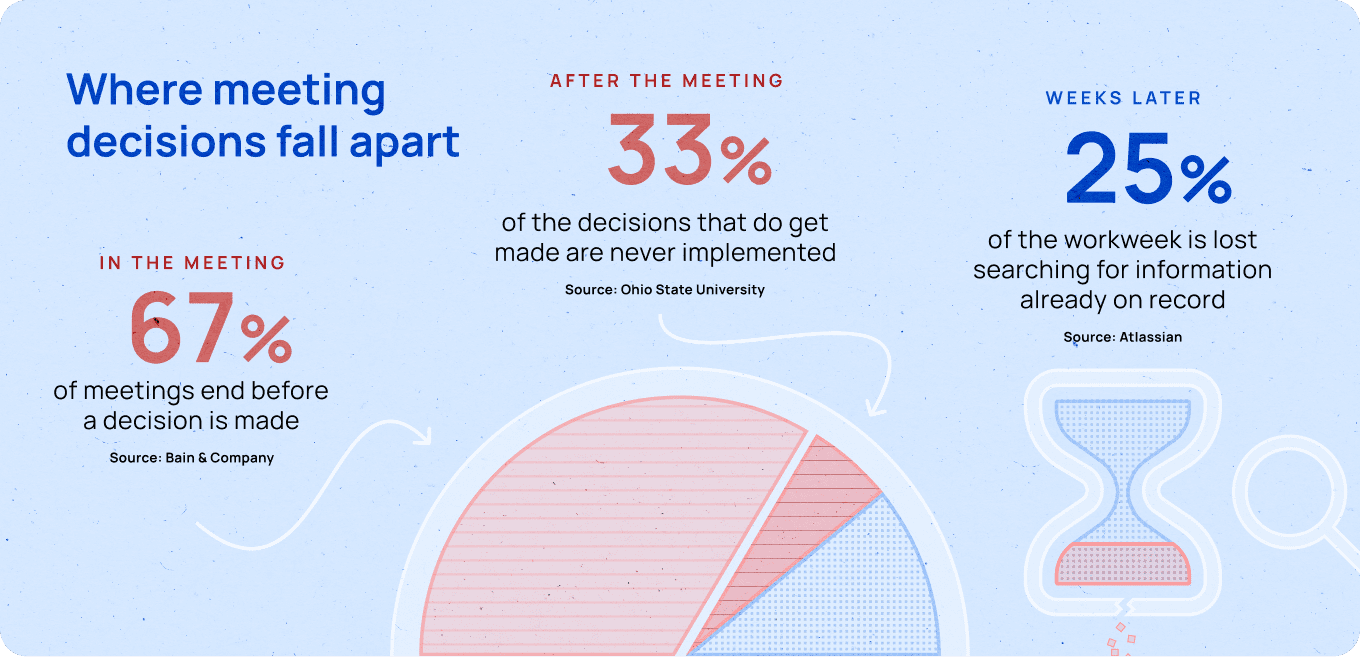
None of this happens because your team lacks effort. It happens because accountability isn't built into the meeting: decisions don't get made, the decisions that do get made often aren't acted on, and nobody can be held to a decision if they can't find it.
Without accountability, meetings don't produce results.
Why Does This Happen in Microsoft Teams?
Teams is one of the most comprehensive meeting tools out there. You get a transcript, a Copilot-generated recap, a chat thread, and the option to create tasks in Planner or To Do. That much output feels like progress, and it's easy to mistake it for meetings that are producing results.
The problem is that nothing here is connected. Six weeks later, it's difficult to answer, "What did we decide, and who is doing something about it?"
Take the Copilot recap as an example. It's a genuine upgrade over traditional note-taking, but it's a text summary, not a system. The decisions live in that one meeting's recap, disconnected from the agenda items that raised them and the Planner tasks that are supposed to follow them.
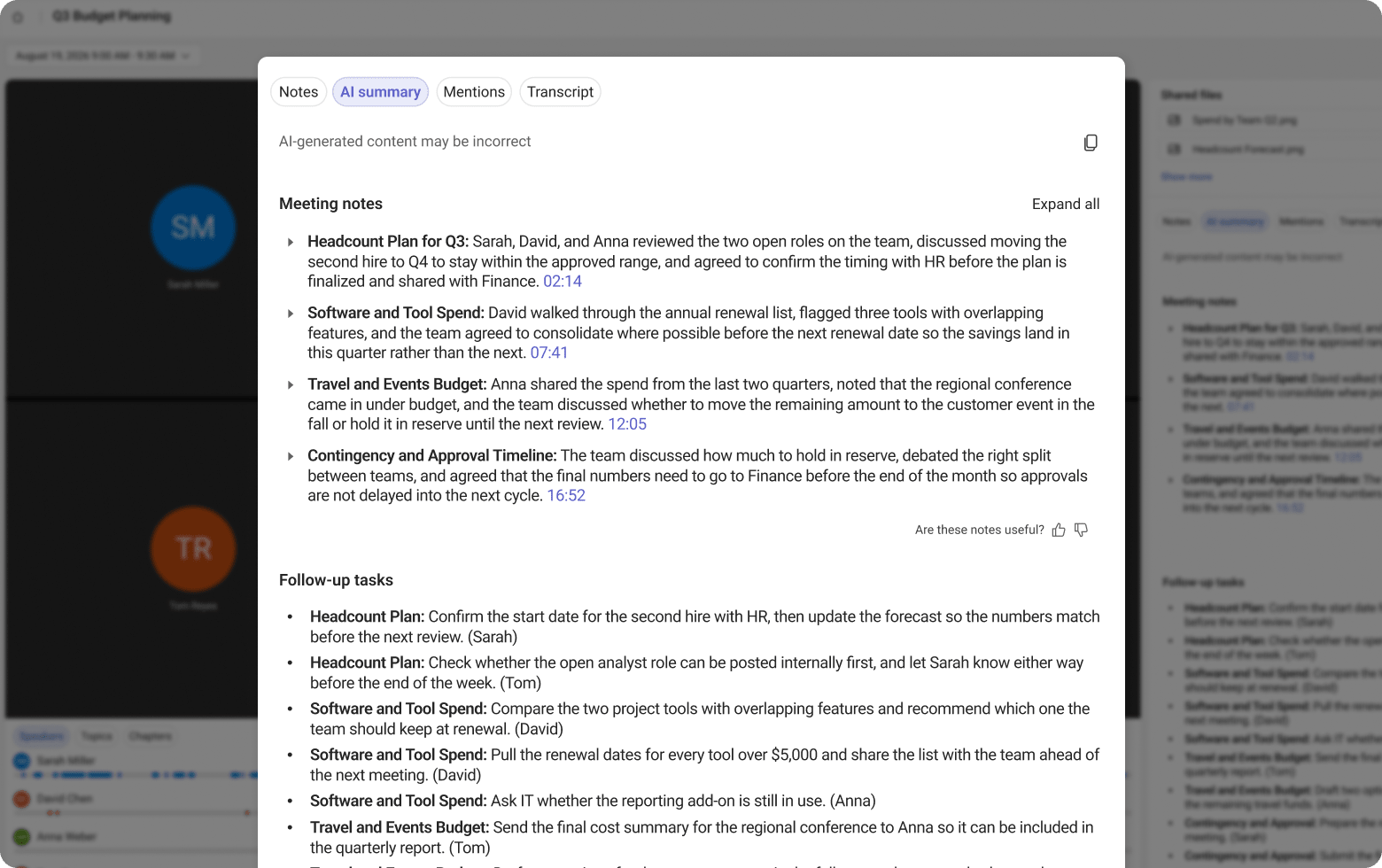
Similarly, a manually created Planner task carries an owner and due date, but not the context behind it. And anything that needs formal approval (e.g., budget, vendor, policy) has no native audit trail, just a bullet point in a recap.
In other words, default Teams meetings produce plenty of information, but the lack of connection and visibility prevents accountability. That's the specific issue Decisions is built to fix.
How Does Decisions Fix This?
Decisions takes a more complete approach: the agenda items, decisions, and follow-up tasks are all connected. There's a structured agenda before the meeting, a live record during, and automated tasks that still explain their reasoning six weeks later. That's what actually creates accountability, not just isolated documentation.
Decisions isn't competing with Copilot, either. Decisions runs natively inside Teams and uses the same meeting data Copilot does — it just takes that data further. Here's a comparison:
| Teams/Copilot | Decisions | |
|---|---|---|
| Before the meeting | Unstructured calendar invite | Agenda builder with ability to mark items as "for decision" |
| During the meeting | Transcription, live captions, chat-based Q&A | Meeting decisions, action items, and votes logged live in the Teams side panel |
| Meeting summary | Single AI-generated recap, not directly editable | AI Recaps or formal AI Minutes, editable and exportable |
| Decision capture | As text within a Copilot recap | As a structured record with a title, status (Proposed or Final), and link to the agenda item, with tasks assigned to named owners |
| Follow-up tasks | Action items appear in the recap for each attendee to follow up on individually | Action items sync to Planner with owner, due date, and status — one shared overview the whole team can access |
| Formal approval | No approval workflow built into the meeting itself; polls are informal and approvals live in a separate app | Secure voting with a recorded, timestamped outcome |
| Searchable across meetings | Limited, tied to an individual meeting recap | Centralized and searchable across meetings and time |
| Requires a bot in the meeting | No (uses Teams' own transcription) | No (uses Teams' own transcription) |
What This Looks Like in Practice
Take the stuck meeting from the top of this piece and follow it through a meeting flow with Decisions:
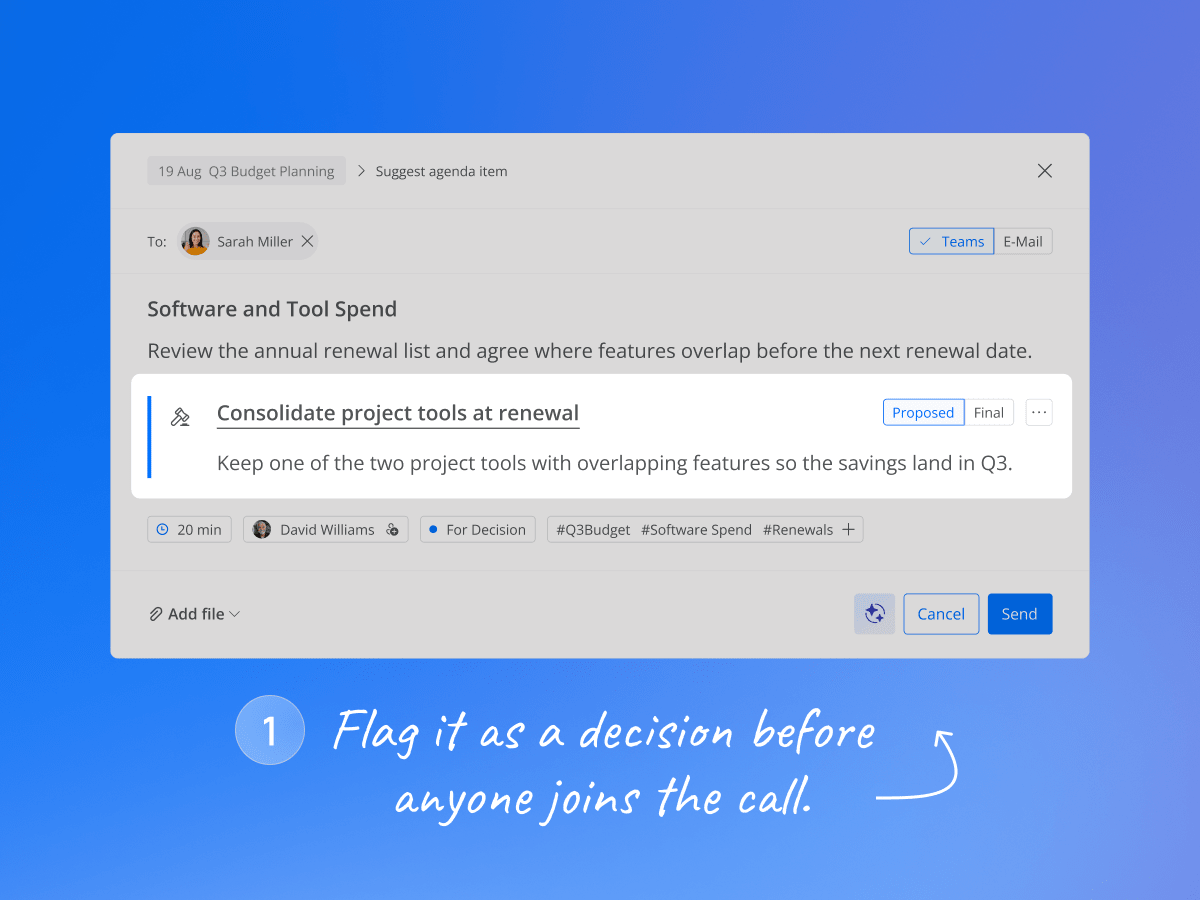
- Before the meeting starts. The agenda flags "Consolidate project tools at renewal" as a decision item, not just a discussion topic, so everyone walks in knowing a decision needs to be made.
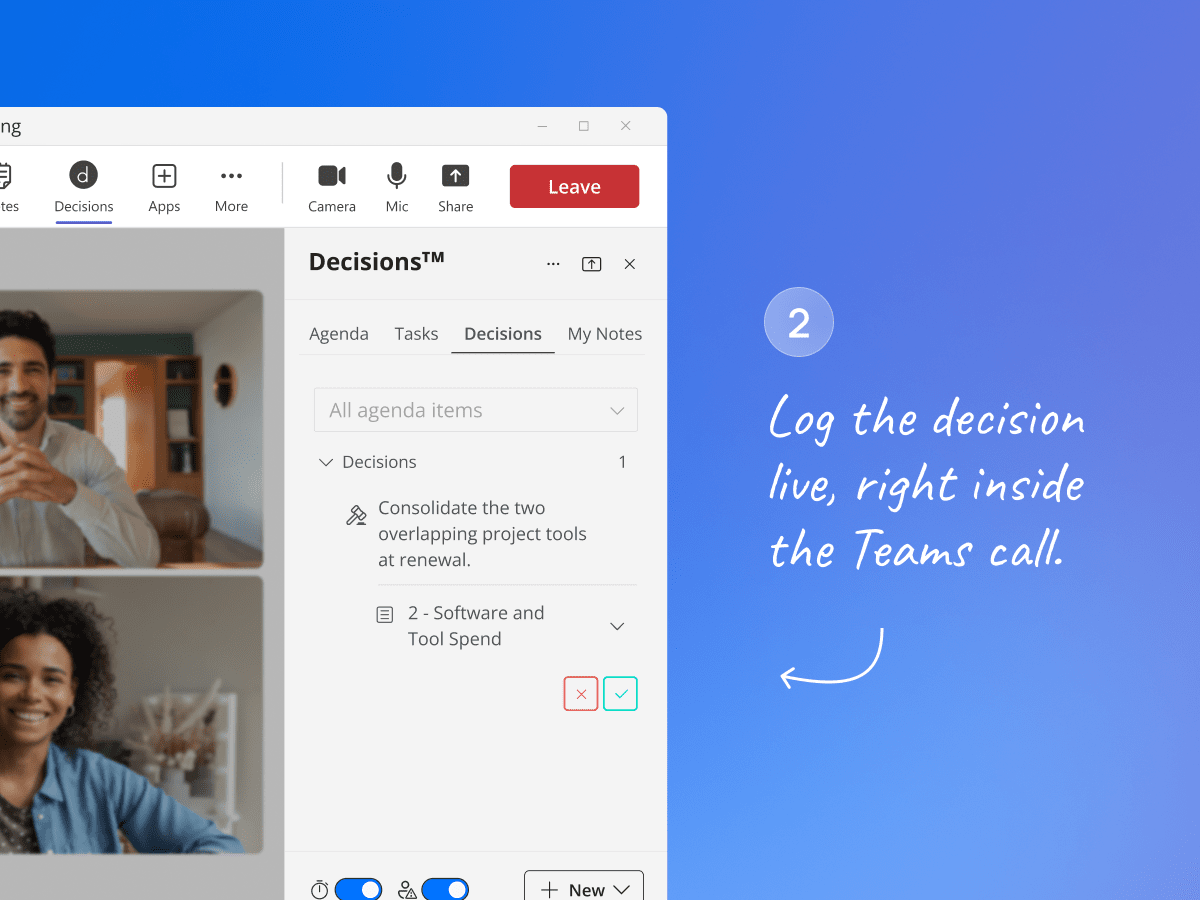
- During the meeting. The decision can be logged live in the Decisions side panel as it's made, with no app-switching and no bot on the call. "Consolidate the two overlapping project tools at renewal" is logged with a status of Proposed, is linked to the agenda item, and has a follow-up task assigned to David Williams due August 28. If the meeting moves too fast for live logging, AI picks it up afterward (next step).
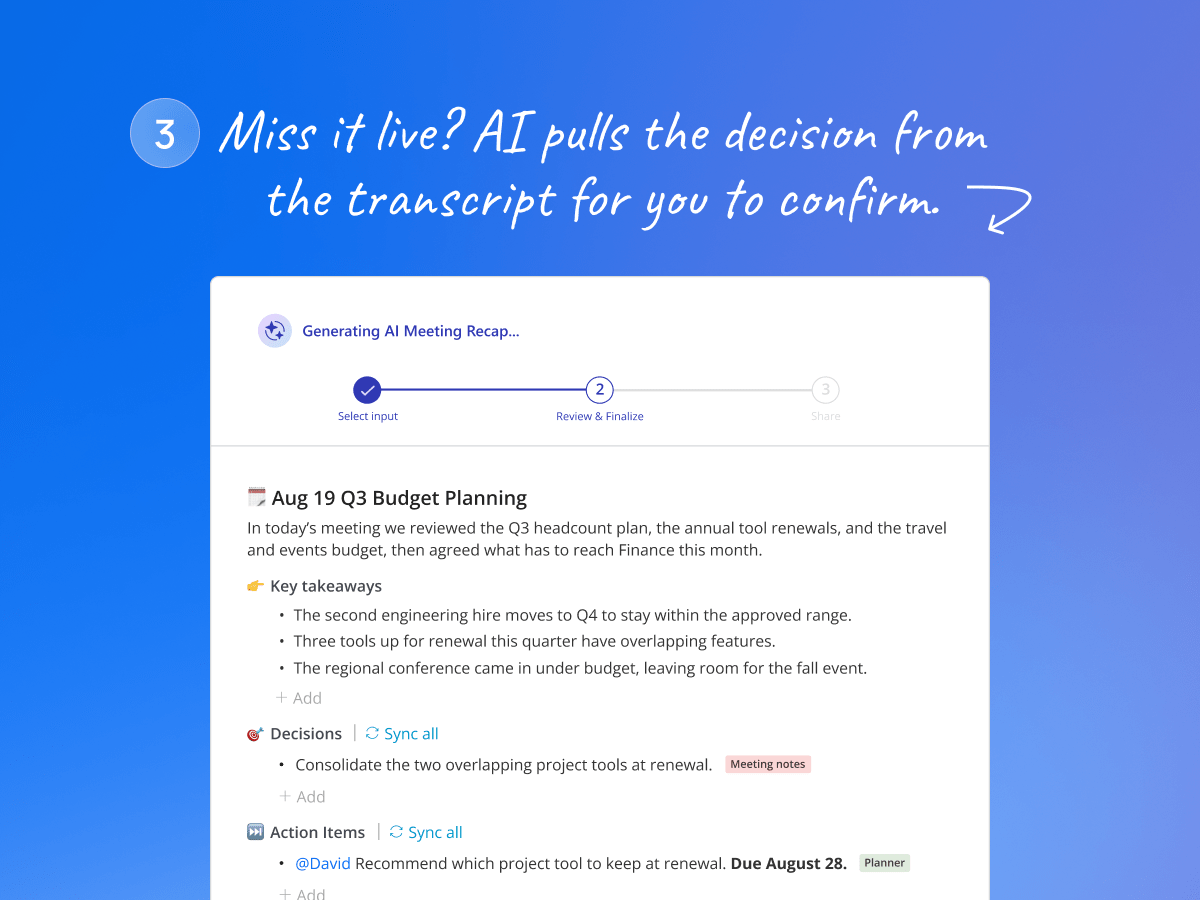
- If nobody logs the decision live. Decisions AI Recaps and AI Minutes surface the decision from the Teams transcript afterward. Instead of starting from scratch, the meeting admin confirms the decision wording, logs it, and generates follow-up tasks with owners and due dates.
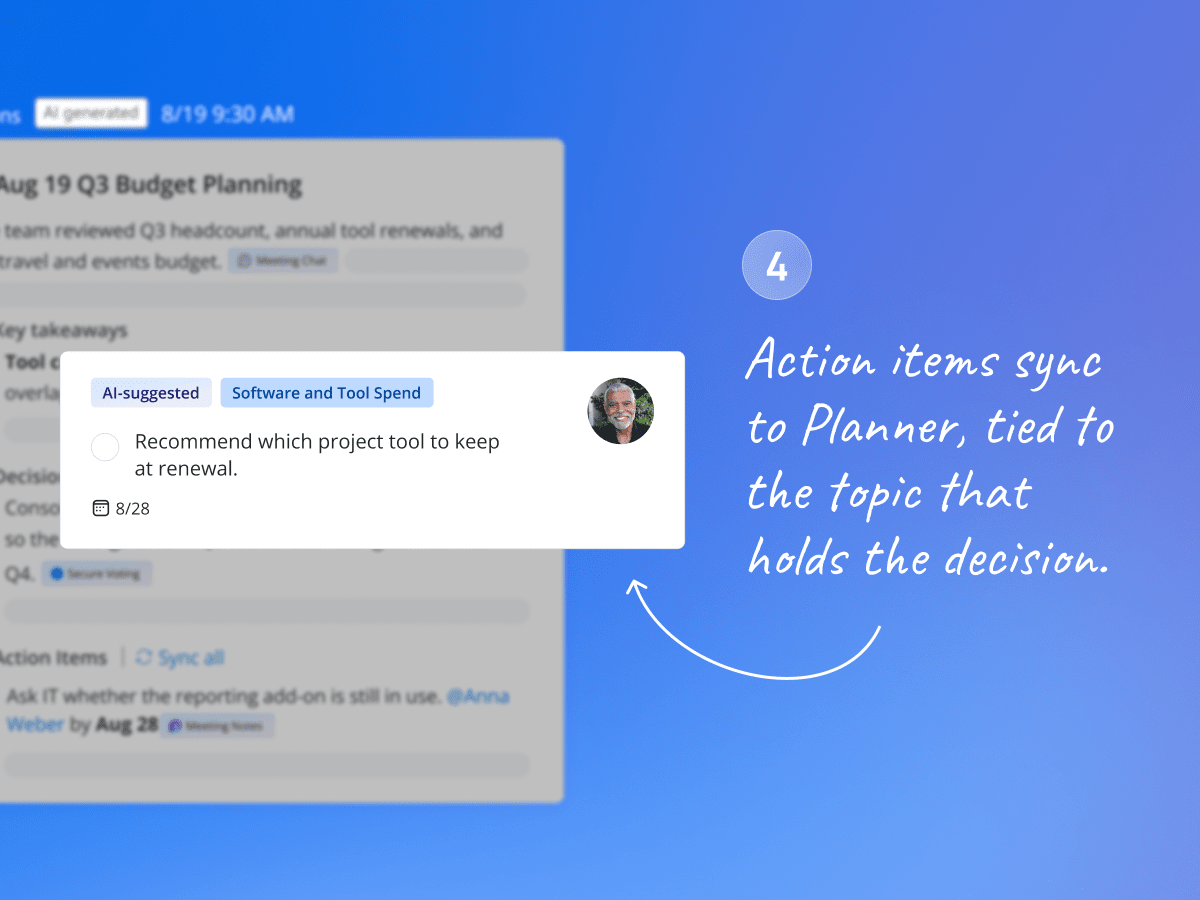
- Follow-up action items. A task goes to Microsoft Planner or To Do, linked back to the agenda topic it came from. That topic holds the full context: the discussion, the materials, and any decision logged on it. So six weeks from now, the task can still answer "Why are we doing this?"
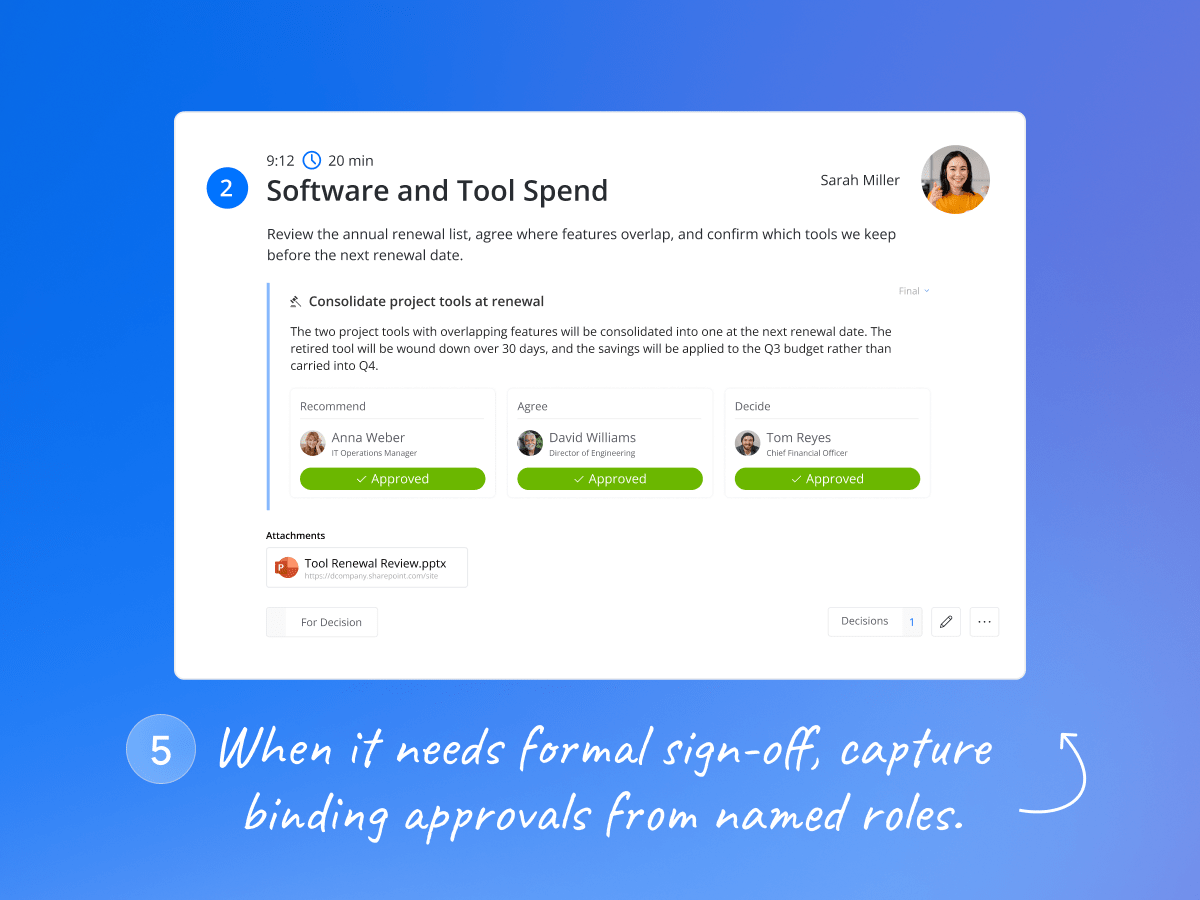
- If it needs formal sign-off. Since this decision needs a documented sign-off, it goes to a secure, timestamped vote instead of a verbal "sounds good." Anna Weber recommends it, David Williams agrees, and Tom Reyes makes the final call. Once approved, the decision's status changes to Final.
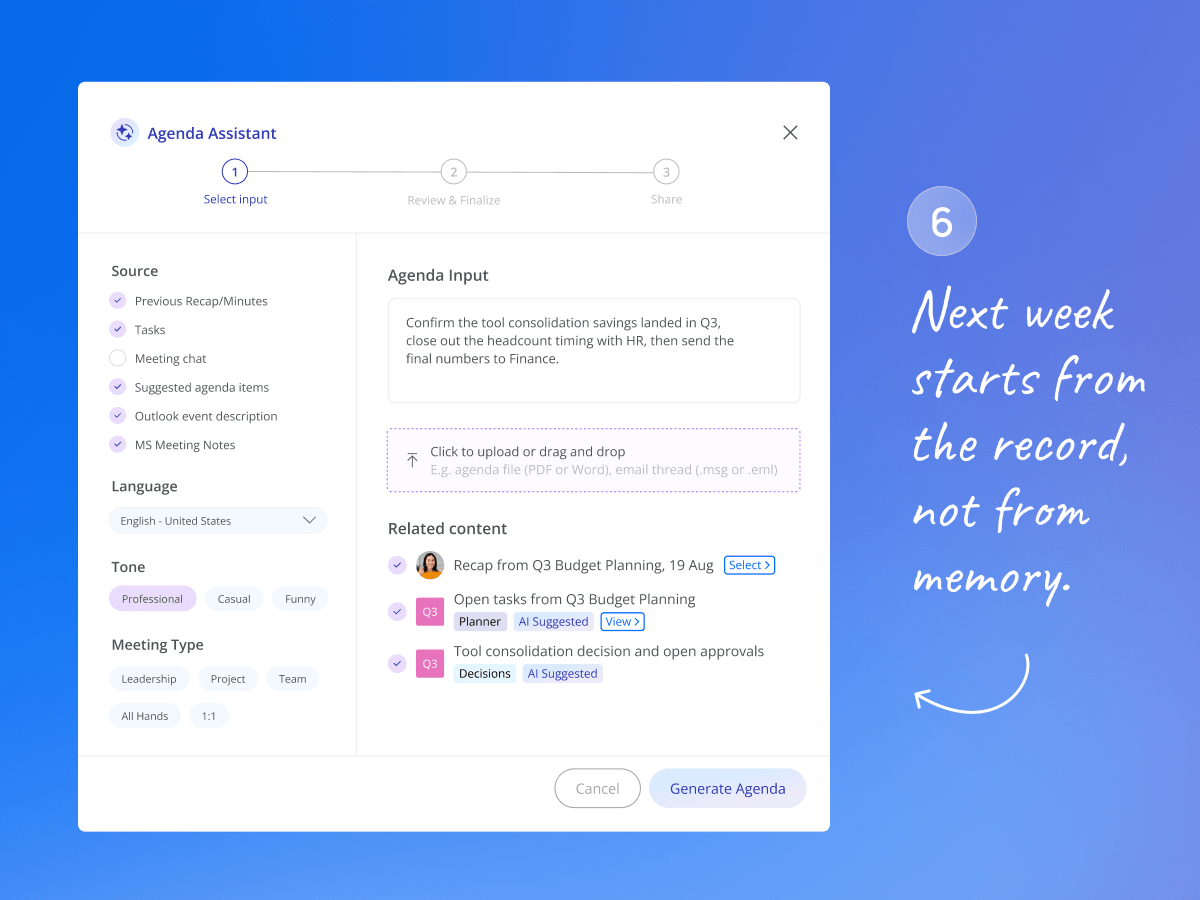
- Carry it into the next meeting. The decision log and open tasks persist across the meeting series, and organizers can pull last meeting's recap or minutes into the new agenda to review tasks, decisions, and statuses. The next meeting starts from record, not from memory.
When You Need Decisions
Decisions works with any Microsoft Teams meeting, but it delivers the most value if any of the following sounds like your team:
-
You run meetings that require structure: leadership meetings, board or committee meetings, project meetings, recurring team meetings, etc.
- Action item follow-through breaks down because nobody remembers why a task was assigned in the first place
- Meeting recaps need to be editable or delivered as formal, structured minutes
-
Meeting decisions need a documented approval trail for compliance, audit, or governance reasons
-
Your organization is a Microsoft 365/Teams shop and you want this natively, without adding a third-party bot or moving data outside your tenant
FAQ
Microsoft Teams already gives you the transcript and the recap. Decisions is what turns that into accountability and results, from the agenda to the follow-up. Here's what teams considering Decisions usually ask: