






Decisions for Microsoft Teams

Great meetings move your organization forward

Decisions helps your team prepare better, meet with focus, and follow through on every decision — with AI handling the agendas, summaries, and follow-up inside Microsoft Teams. Great meetings become the norm in your organization.

Teams Rating
Meeting Lifecycle Graphic
Backe_Logo
Vestas_Logo
BDO_Logo
NHS_Logo
Beiersdorf_Logo
Man Power Logo Dark Grey
Backe_Logo
Vestas_Logo
BDO_Logo
NHS_Logo
Beiersdorf_Logo
Man Power Logo Dark Grey
Backe_Logo
Vestas_Logo
BDO_Logo
NHS_Logo
Beiersdorf_Logo
Man Power Logo Dark Grey
Backe_Logo
Vestas_Logo
BDO_Logo
NHS_Logo
Beiersdorf_Logo
Man Power Logo Dark Grey
Backe_Logo
Vestas_Logo
BDO_Logo
NHS_Logo
Beiersdorf_Logo
Man Power Logo Dark Grey
Backe_Logo
Vestas_Logo
BDO_Logo
NHS_Logo
Beiersdorf_Logo
Man Power Logo Dark Grey
Backe_Logo
Vestas_Logo
BDO_Logo
NHS_Logo
Beiersdorf_Logo
Man Power Logo Dark Grey
Backe_Logo
Vestas_Logo
BDO_Logo
NHS_Logo
Beiersdorf_Logo
Man Power Logo Dark Grey
Backe_Logo
Vestas_Logo
BDO_Logo
NHS_Logo
Beiersdorf_Logo
Man Power Logo Dark Grey
Backe_Logo
Vestas_Logo
BDO_Logo
NHS_Logo
Beiersdorf_Logo
Man Power Logo Dark Grey
Trusted by 1000s of the world's top organizations — like yours.
WHY DECISIONS

Why choose Decisions?

Without Decisions

Meetings end. Work gets scattered.

  • Agendas live in emails, chats, or not at all
  • Notes depend on whoever remembered to write them
  • Decisions are hard to find after the call
  • Action items slip without clear ownership
With Decisions

Meetings end. Work moves forward.

  • Structured agendas, ready before you meet
  • AI-assisted minutes drafted from the discussion
  • Decisions captured in a searchable record
  • Tasks sync to Planner with owners attached
THE FULL MEETING LIFECYCLE

Before, during, and after. Handled.

So your team walks into every meeting prepared, walks out with clear decisions and follow-ups, and always drives the business forward.
BEFORE THE MEETING

Build agendas that drive alignment

Build structured agendas with time allocations, presenters, and attachments. When your team sees the agenda in advance, with clear topics, time, and expectations, they show up prepared, ready to contribute.

They can also add input, suggest topics, and align on priorities before the meeting starts. So you spend the time together making decisions, not catching up.
 

No one's catching up in the first ten minutes.
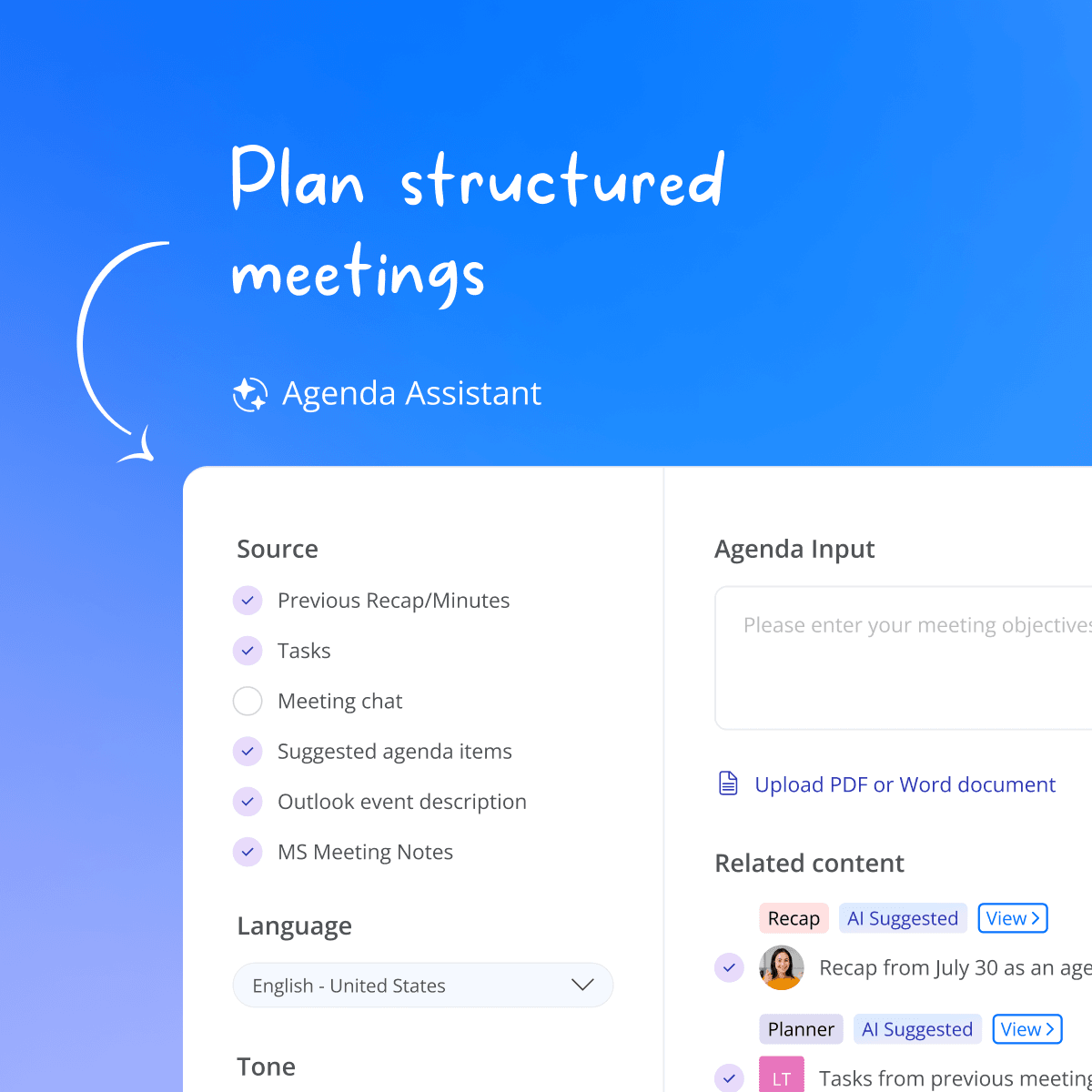
Microsoft Teams meeting agenda built in Decisions before a meeting.
DURING THE MEETING

Keep meetings focused and actionable

Your team focuses on the meeting. Decisions handles the rest, tracking time, logging decisions, capturing tasks and votes as they happen. Works the same whether you're remote, hybrid, or face to face.

No recording bots. No external tools listening in. Everything stays in your Teams environment.
 

Every decision and task captured in real time
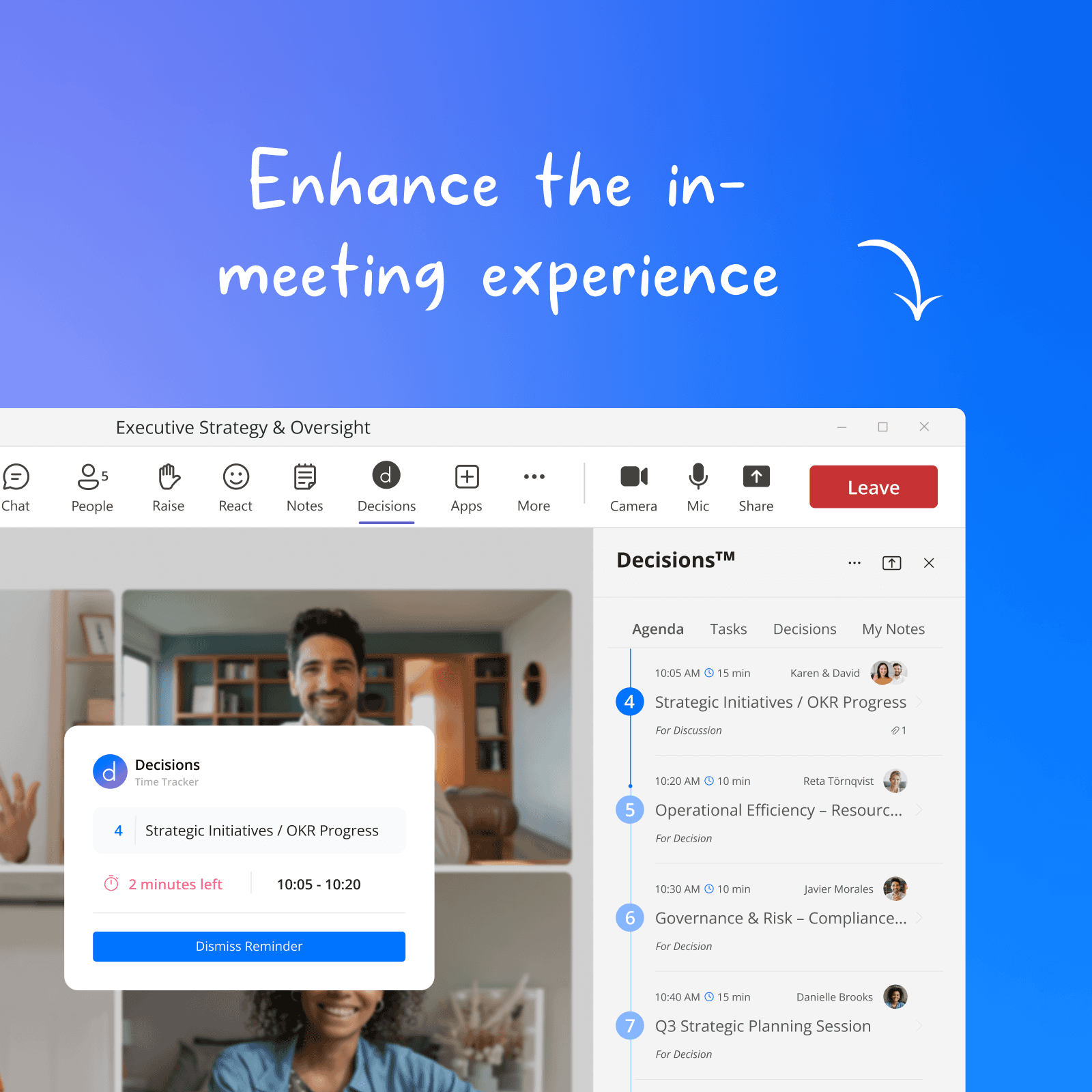
Microsoft Teams meeting in progress with the Decisions agenda keeping the discussion on time and on track.
AFTER THE MEETING

AI summaries you can act on

Short recaps or more detailed minutes are ready when you leave the call. Every decision is logged, every task has an owner and a deadline, and nothing depends on someone remembering to write it up.

Your team moves straight from meeting to action, with the tasks synced to Microsoft Planner with assignees and due dates attached.
 

Reclaim 20+ minutes per meeting on manual note-writing
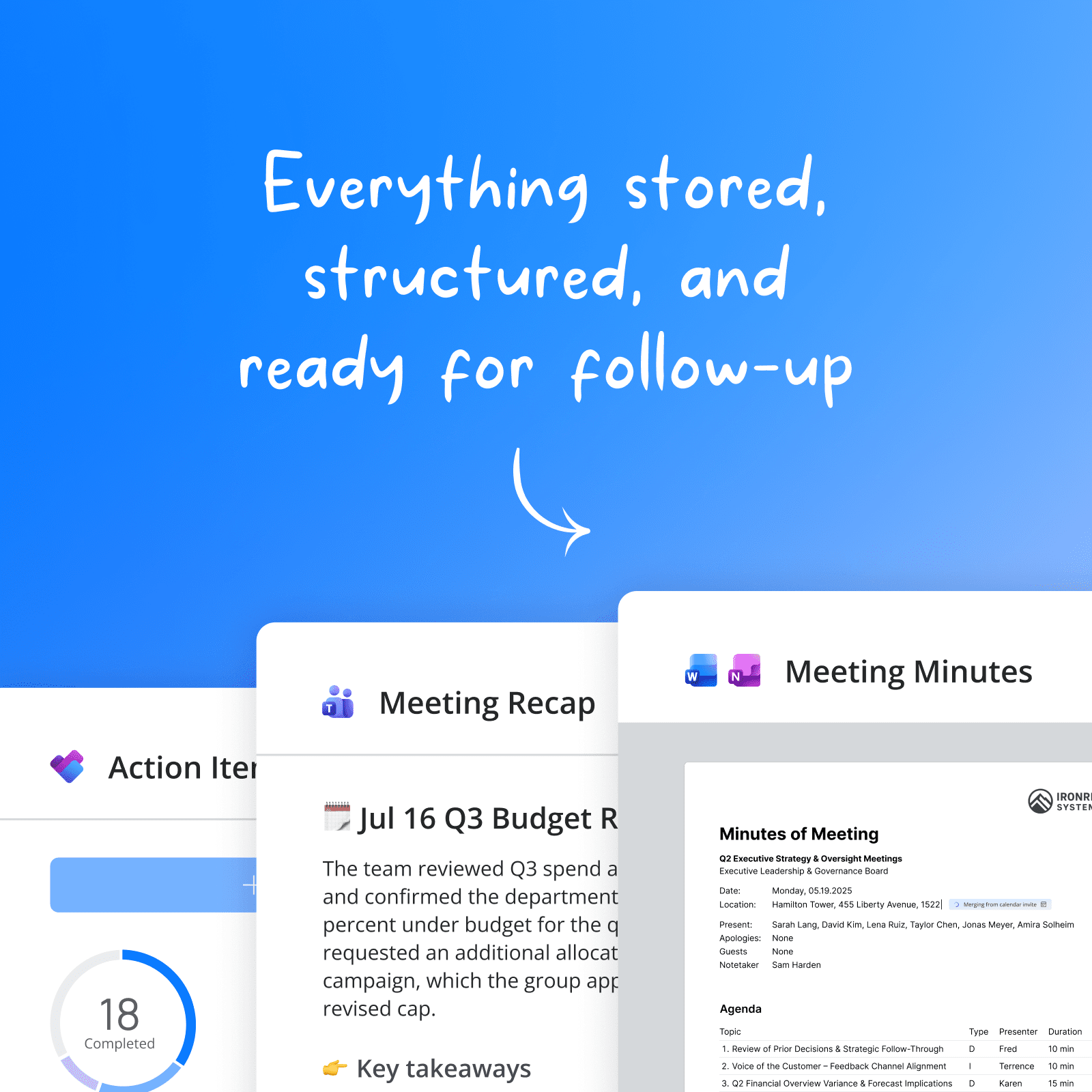
Decisions AI meeting summary inside Microsoft Teams showing decisions and action items.

ENTERPRISE-GRADE SECURITYAI-powered.
IT approved.

Decisions is SOC 2 Type II and ISO 27001:2022 certified, runs natively inside your Microsoft 365 tenant, and never uses third-party meeting bots.

Visit our Trust Center →

Decisions Security Badges (1)
Microsoft Azure logo
OpenAI logo
Entra logo
OneDrive logo
Word logo
Excel logo
PowerPoint logo
OneNote logo
Sharepoint logo
Teams logo
M365 logo
Microsoft Copilot logo
Microsoft Azure logo
OpenAI logo
Entra logo
OneDrive logo
Word logo
Excel logo
PowerPoint logo
OneNote logo
Sharepoint logo
Teams logo
M365 logo
Microsoft Copilot logo
Microsoft Azure logo
OpenAI logo
Entra logo
OneDrive logo
Word logo
Excel logo
PowerPoint logo
OneNote logo
Sharepoint logo
Teams logo
M365 logo
Microsoft Copilot logo
Microsoft Azure logo
OpenAI logo
Entra logo
OneDrive logo
Word logo
Excel logo
PowerPoint logo
OneNote logo
Sharepoint logo
Teams logo
M365 logo
Microsoft Copilot logo
Microsoft Azure logo
OpenAI logo
Entra logo
OneDrive logo
Word logo
Excel logo
PowerPoint logo
OneNote logo
Sharepoint logo
Teams logo
M365 logo
Microsoft Copilot logo
Microsoft Azure logo
OpenAI logo
Entra logo
OneDrive logo
Word logo
Excel logo
PowerPoint logo
OneNote logo
Sharepoint logo
Teams logo
M365 logo
Microsoft Copilot logo
Microsoft Azure logo
OpenAI logo
Entra logo
OneDrive logo
Word logo
Excel logo
PowerPoint logo
OneNote logo
Sharepoint logo
Teams logo
M365 logo
Microsoft Copilot logo
Microsoft Azure logo
OpenAI logo
Entra logo
OneDrive logo
Word logo
Excel logo
PowerPoint logo
OneNote logo
Sharepoint logo
Teams logo
M365 logo
Microsoft Copilot logo
Microsoft Azure logo
OpenAI logo
Entra logo
OneDrive logo
Word logo
Excel logo
PowerPoint logo
OneNote logo
Sharepoint logo
Teams logo
M365 logo
Microsoft Copilot logo
Microsoft Azure logo
OpenAI logo
Entra logo
OneDrive logo
Word logo
Excel logo
PowerPoint logo
OneNote logo
Sharepoint logo
Teams logo
M365 logo
Microsoft Copilot logo

Decisions works natively with all your Microsoft 365 apps + services

GETTING STARTED

How fast can my team start using Decisions?

Decisions installs from the Microsoft Teams app store in 30 seconds — no software, no firewall rules, no IT ticket.
1

Add to Teams

Install Decisions from the Microsoft Teams app store or your admin center.

30 seconds. Zero IT footprint.
2

Create your first agenda

Pick a template or start from scratch. Add items, time, and share with your team.

Works with any existing Teams meeting.
3

Meet, and let AI handle the rest

Run your meeting with the side panel. Decisions captures everything. AI drafts the minutes.

Minutes, tasks, and decisions. Done.

Don't just take our word for it

“Decisions AI has streamlined our meeting workflow and improved communication across the board. I totally recommend it to my colleagues — it’s a smart tool that delivers real value.”
Andrea W.
Faculty Manager
“The shared agenda and note taking components are a huge help to make sure the right topics are discussed and we are using our time wisely during meetings.”

Beth A.
Senior Customer Excellence Operations Manager
"Working in a highly regulated area, I have spent hours a week creating agendas (especially modifying timeslots), generating minutes, capturing actions and logging decisions. Decisions AI and Teams have reduced that time ten fold."
Phey R
Phey R.
Associate Partner
COMMON QUESTIONS

Everything you need to know about Decisions

Decisions is the only meeting management platform built natively inside Microsoft Teams, combining agendas, AI minutes, Planner sync, and a personal AI meeting agent in one workflow your whole team adopts in a day. Thousands of organizations trust Decisions for the full meeting lifecycle.
Meeting management software helps teams prepare for, run, and follow up on meetings in a structured way. It typically covers agenda creation, real-time facilitation (notes, time tracking, voting), and post-meeting documentation (minutes, decisions, action items). Decisions is the AI meeting management platform for Microsoft Teams, used by thousands of organizations to extend the category with AI-generated agendas, recaps, and minutes, all built natively inside your Microsoft 365 environment.
AI notetakers give you a summary after the meeting. Decisions manages the full lifecycle: structured agendas before, time tracking and task capture during, and AI minutes with Planner sync after. Plus Decisions adds governance features like secure voting, case submission, and compliance-grade audit trails, with no third-party bot ever joining your calls.
Yes. Decisions is built natively on Microsoft 365 and runs inside Microsoft Teams as a personal app, channel tab, message extension, and in-meeting side panel. It also integrates with Outlook, Word, OneNote, Planner, and SharePoint. If your organization runs on Microsoft 365, Decisions fits in without new infrastructure.
Decisions AI drafts minutes from the meeting transcript combined with your agenda structure, including decision items, presenters, and time allocations, which makes them more accurate than transcript-only summaries. Every minute is a draft you can edit directly in Decisions or refine with AI-assisted changes, and individual agenda items can be regenerated independently if needed.
Decisions supports the major European languages across our markets, including English, French, German, Dutch, and Norwegian. AI agendas, recaps, and minutes can be generated in any supported language, and the Decisions interface follows your Microsoft 365 language settings.
All meeting content stays in your organization's Microsoft 365 tenant. Decisions' own servers store only object IDs, never your content. AI processing happens through Azure OpenAI with no data retention. Decisions is SOC 2 Type II and ISO 27001:2022 certified, GDPR compliant, and aligned with the EU AI Act. Learn more about our security & compliance policies.
Decisions has a free tier with 100 core credits and 100 AI credits per month, no credit card required. Paid Decisions plans start at the Business tier (per user, per month, billed annually). Enterprise pricing is available for 50+ users and includes SSO, advanced governance, and admin controls. View pricing.
Under a minute for individuals: install Decisions from the Microsoft Teams app store and go. IT admins can push Decisions through the Microsoft 365 Admin Center with no software installation on end-user devices, no firewall rules to configure, and no IT ticket required.
Decisions lives inside Microsoft Teams, the tool your team already opens every day. There is no separate app to learn and no new login. The Decisions meeting side panel loads automatically, and AI handles the most tedious part of meeting documentation without anyone changing their workflow. 94% of organizations that adopt Decisions have AI features enabled.
Yes. The Decisions AI mobile app is available on iOS and Android. Use it to access agendas, review meeting books, leave comments, record in-person meetings for AI capture, and stay on top of tasks. IT teams can deploy and manage the Decisions mobile app through Microsoft Intune.
Still have questions?

Put every part of the meeting on autopilot

Start free - no credit card required. Install in Microsoft Teams and run your first structured meeting today.

No credit card required. No IT ticket needed. Works with any Microsoft 365 plan.